
Venue Owner & Photographer Use Case
How to Market One Venue as Many: Event Space Design Visuals That Drive Bookings
An empty room is one of the hardest things to sell. Potential clients browsing venue listings are not trying to book square footage - they are trying to picture their event. This article shows how venue owners can use RogerApp.ai to market the same real space as a wedding venue, a corporate event venue, a holiday party venue, and a photoshoot location - without staging the room again or commissioning expensive re-shoots.
Most venue listings show the room. Clean floors, good lighting, the architecture in its best neutral state. It is a reasonable starting point - but it is also one of the weakest ways to communicate what a space can become.
The problem is not the photography. The problem is that an empty room asks every potential client to do the same difficult mental exercise: stand in a bare space and imagine it full of people, decorated for a specific occasion, lit for a particular atmosphere, and configured for an event that does not yet exist. Some clients can do this. Most cannot - at least not well enough to feel confident booking.
When a client is evaluating a corporate event venue for a product launch, they are not buying the room. They are buying the version of the room that makes their event look right. When a couple is considering an outdoor garden space for their ceremony, they are not seeing the grass and the trees - they are trying to picture their wedding color palette and ceremony setup in that specific environment. If that picture does not form clearly, the inquiry stalls. The tour gets postponed. The booking goes elsewhere.
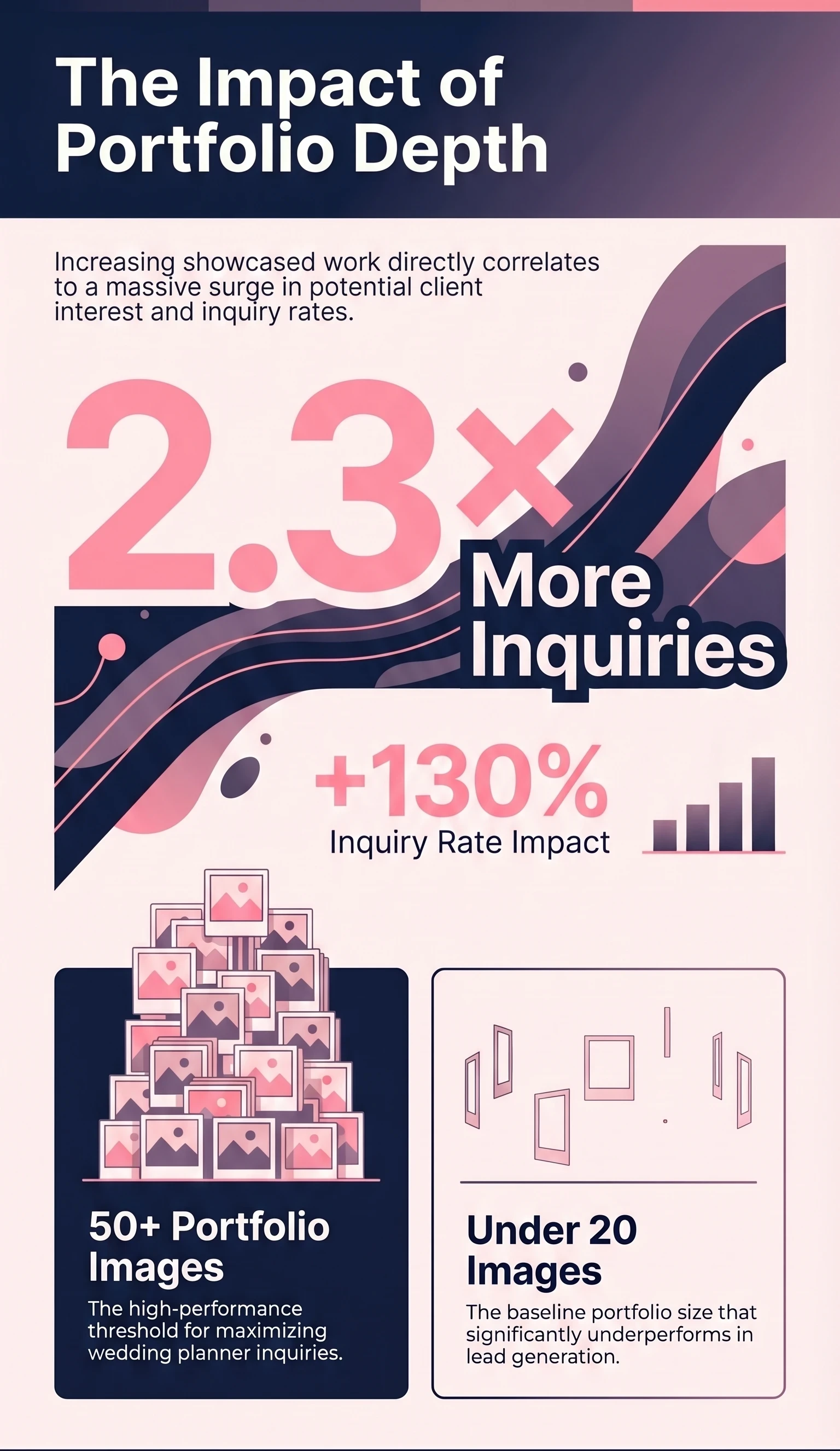
Venue listings with professional photography already receive 40 percent more booking inquiries than those without. But the opportunity goes further than better photography. The venues that convert best are the ones that show the event - not just the space.
Key Takeaways
| Point | Details |
|---|---|
| Empty venue photos make buyers do imagination work | Styled visuals close the gap between empty space and client's event vision. |
| RogerApp.ai edits the real venue photo | Shows different event setups while keeping the space recognizable - architecture stays, event context changes. |
| One venue, six or more revenue scenarios | Market the same space as wedding venue, corporate event venue, holiday party venue, photoshoot location, and more. |
| Styled images drive bookings | Styled venue images increase booking inquiries by up to 35% and improve conversion by 18%. |
| Transparency builds trust | AI-assisted venue visuals are legitimate marketing - provided they are honest about what is real. |
Empty Spaces Don't Sell the Event
Venue listings with professional photography receive 40% more booking inquiries than those without. But the opportunity goes further than better photography - the venues that convert best are the ones that show the event, not just the space.
What RogerApp.ai Does for a Venue Owner
For venue owners, RogerApp.ai solves a specific and recurring problem: how to show the same real space in multiple commercial contexts without rebuilding the room every time.
The starting point is always the real venue photo. RogerApp.ai does not generate a fictional room that happens to resemble the venue. It edits the actual image - keeping the architecture, the dimensions, the ceiling height, the windows, and the characteristic details that make the space recognizable - while selectively changing everything that represents a specific event setup.
Table configurations, furniture arrangements, lighting mood, floral decor, staging, signage, branded elements, and seasonal decoration can all be adjusted or added without touching a single chair in the real room.
This means a single source photo of an empty event space can become:
- A wedding reception visual
- A corporate seminar setup
- A holiday party venue dressed for December
- A product launch venue with branded stage and screens
- An editorial photoshoot location
All from the same base image, all in the same recognizable space.
The RogerApp.ai tools that make this possible include selective masking to isolate and edit specific areas, image merging to layer event elements into the real photo, color and lighting adjustments to shift the atmospheric mood between event types, text and signage overlays for branded corporate visuals, and upscaling for high-resolution output suitable for print and web marketing.
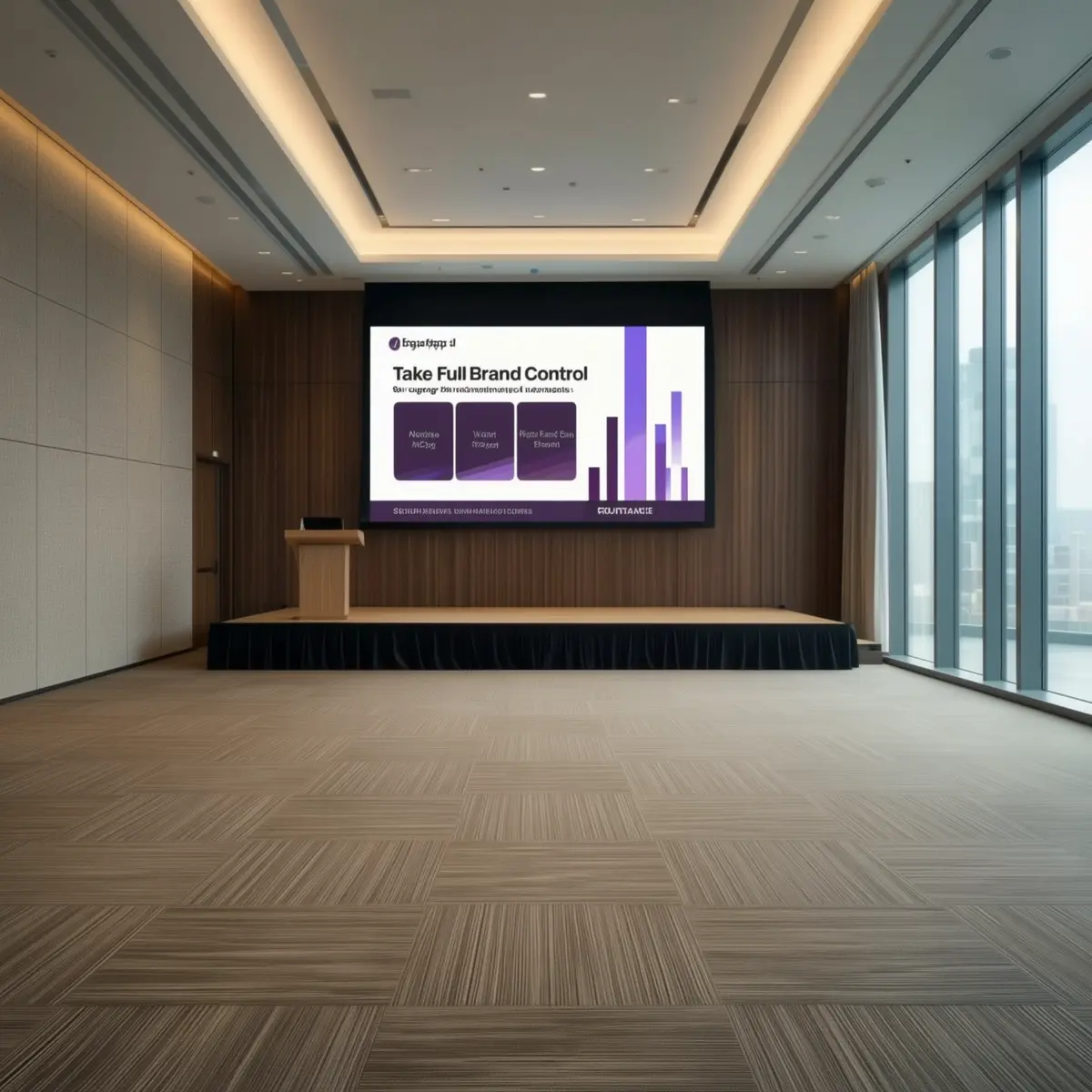
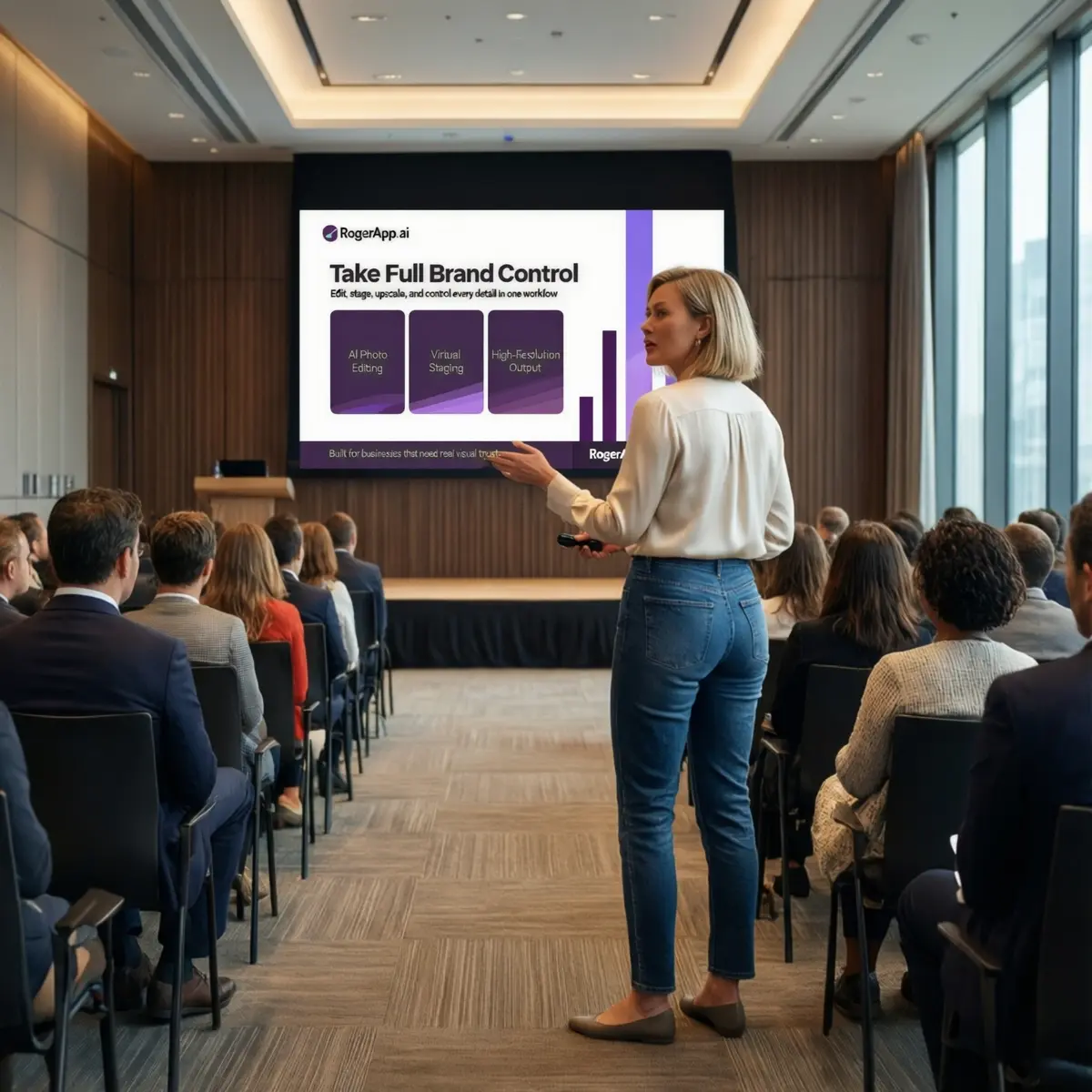
The empty conference venue - stage, screen, and architecture unchanged. The edited photo shows the same space with a live presenter and seated corporate audience added using RogerApp.ai. The architecture stays identical; only the event context changes.
The Best Use Cases for Venue Owners
The strongest applications of RogerApp.ai for venue owners are the ones that directly address how different buyer segments evaluate an event space. Each use case below removes a specific barrier between the potential client and a booking decision.
1. Empty venue to wedding-ready preview
Show the space dressed for a ceremony or reception - florals, table settings, aisle layout, lighting mood - so couples evaluating it as a wedding venue can picture the day rather than the room.
2. Corporate event venue setup
Show the space configured for a seminar, a boardroom-style meeting, or a standing networking event. Corporate clients booking a corporate event venue need to see seating capacity and layout in visual terms, not floor plans.
3. Product launch venue with branded staging
Overlay the client's brand, signage, and stage setup onto the real venue photo. A product launch venue decision is often made before the client has visited in person - a branded visual dramatically shortens that decision cycle.
4. Holiday party venue dressed for the season
Show the space in December lighting, with seasonal decoration and a festive table layout. Holiday party venue searches peak months before the season - venues that show the atmosphere early capture inquiries that others miss.
5. Photoshoot location showcase
Editorial and commercial photographers searching for a photoshoot location want to see the space as a working set - with light, props, and background context. RogerApp.ai can style the venue for different shoot concepts without a physical setup.
6. Seasonal decor refreshes without re-staging
Update venue marketing imagery for spring, summer, autumn, and winter without scheduling a new shoot for each season.
7. Different table layouts and capacity configurations
Show theatre-style, banquet, classroom, and cocktail configurations in the same space so clients can immediately evaluate the venue against their specific event format.
The Business Case for the Venue Owner
Better visuals are not a cosmetic upgrade. For venue owners, the commercial impact is measurable at every stage of the booking funnel.
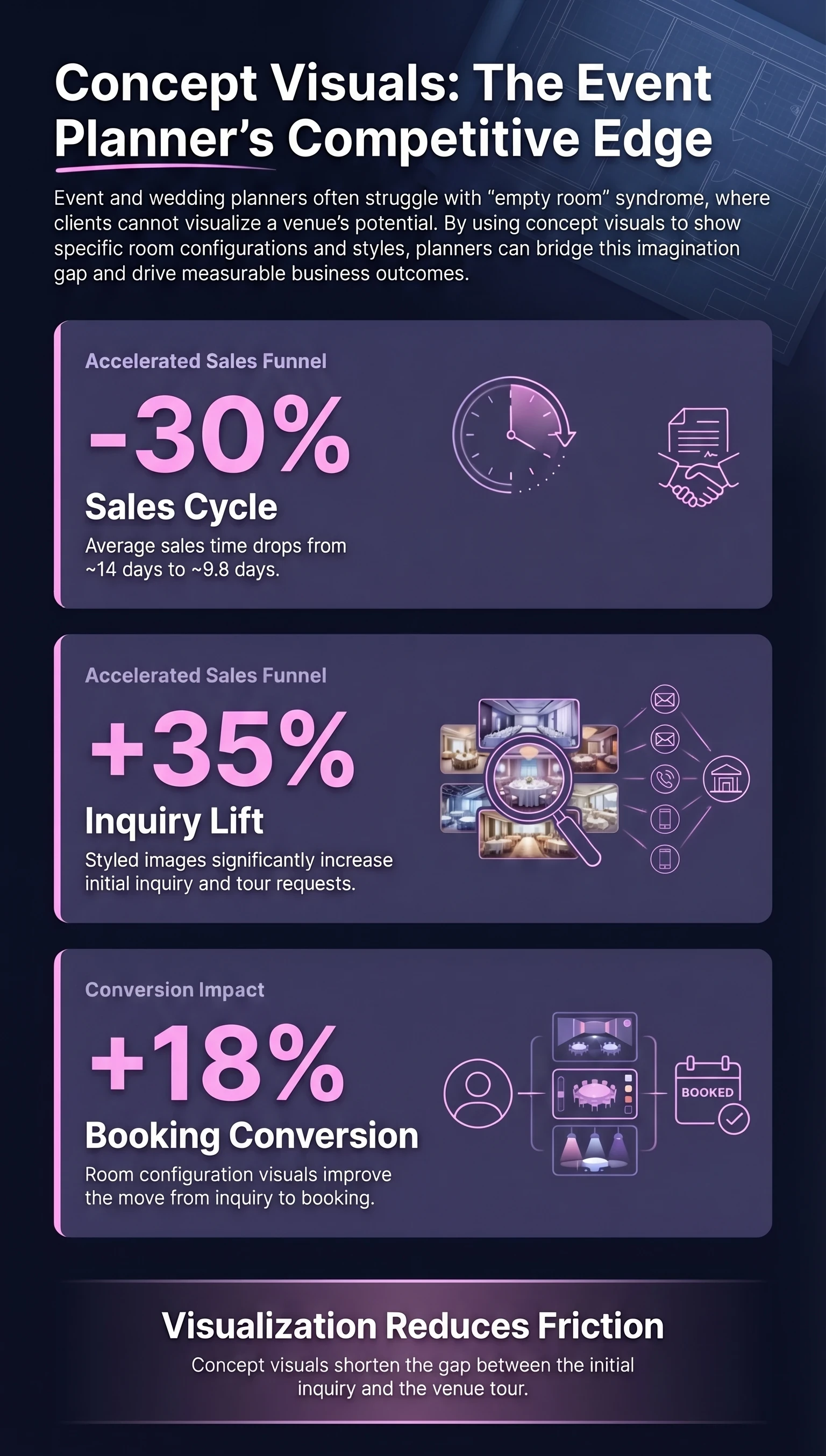
Styled images increase initial inquiry and tour requests by 35 percent compared to empty room photography. Booking conversion improves by 18 percent when potential clients can see different setup configurations clearly. Combined with the 40 percent inquiry lift from professional photography, the cumulative effect on annual booking volume is substantial.
The quality of inquiries also improves. A client who has already seen the venue styled for their specific event type arrives at a viewing with a much clearer picture of what they want. They ask more specific questions. They make faster decisions. And they are significantly less likely to walk away because they could not picture the space working for them.
Show How One Venue Can Host Different Events
A venue is not a single product. It is a space with the potential to serve many different buyer groups - each of whom is looking for something specific, and each of whom needs to see the space through their own event lens before they can commit.
The venue owner who markets only one version of their space is leaving a significant portion of their potential market unaddressed. The couple searching for a wedding venue and the marketing director evaluating a product launch venue are looking at the same room - but they need completely different visuals to reach a decision.
RogerApp.ai makes it practical to develop a distinct visual story for each revenue segment without rebuilding the room for every photoshoot.
Wedding Venue
Ceremony setup, reception tables, florals, and romantic lighting in the real space.
Private Dining
Intimate table settings, candlelight, and styled tableware for private dinner events.
Corporate Event Venue
Stage, seating, and branded screens for conferences, seminars, and company events.
Product Launch Venue
Branded staging, signage, and standing reception layout for launch events.
Holiday Party Venue
Seasonal decoration, festive lighting, and party table configurations.
Photoshoot Location
Editorial and commercial set styling for photographers and creative agencies.
Cost and Speed Savings Compared to Traditional Re-Shoots
The traditional alternative to venue visualisation is physical re-staging and re-photography. For a venue that wants to show four or five distinct event setups across its marketing materials, that means four or five separate shoot days, four or five sets of styling costs, and four or five rounds of editing and production before a single image is ready to publish.
A full venue photo shoot typically costs between $1,500 and $3,000 and requires five or more days from briefing to final delivery. Seasonal re-staging adds $2,000 to $5,000 and two weeks of lead time for each update cycle.
RogerApp.ai reduces the cost of producing a styled venue visual to $200-$500 per output set, with a turnaround of one day rather than five. Seasonal updates that previously required a full re-shoot can be produced in two days at a fraction of the cost.
Why This Improves Customer Confidence
When a potential client lands on a venue listing and sees the room styled for their specific type of event - their industry's version of a corporate setup, their aesthetic for a celebration, their brand applied to the stage - something shifts. The space stops being an abstract possibility and becomes a specific one.
That shift - from abstract to specific - is what drives the inquiry. It is what makes someone move from browsing to booking a tour. And it is what reduces the number of tours that end without a decision, because the client arrives already partially convinced rather than starting from zero.
For venues that serve multiple event types, this means every buyer segment gets a version of the space that speaks directly to them. The couple searching for a wedding venue sees the romance. The event director evaluating a corporate event venue sees the professionalism. The photographer looking for a photoshoot location sees the light and the set potential.
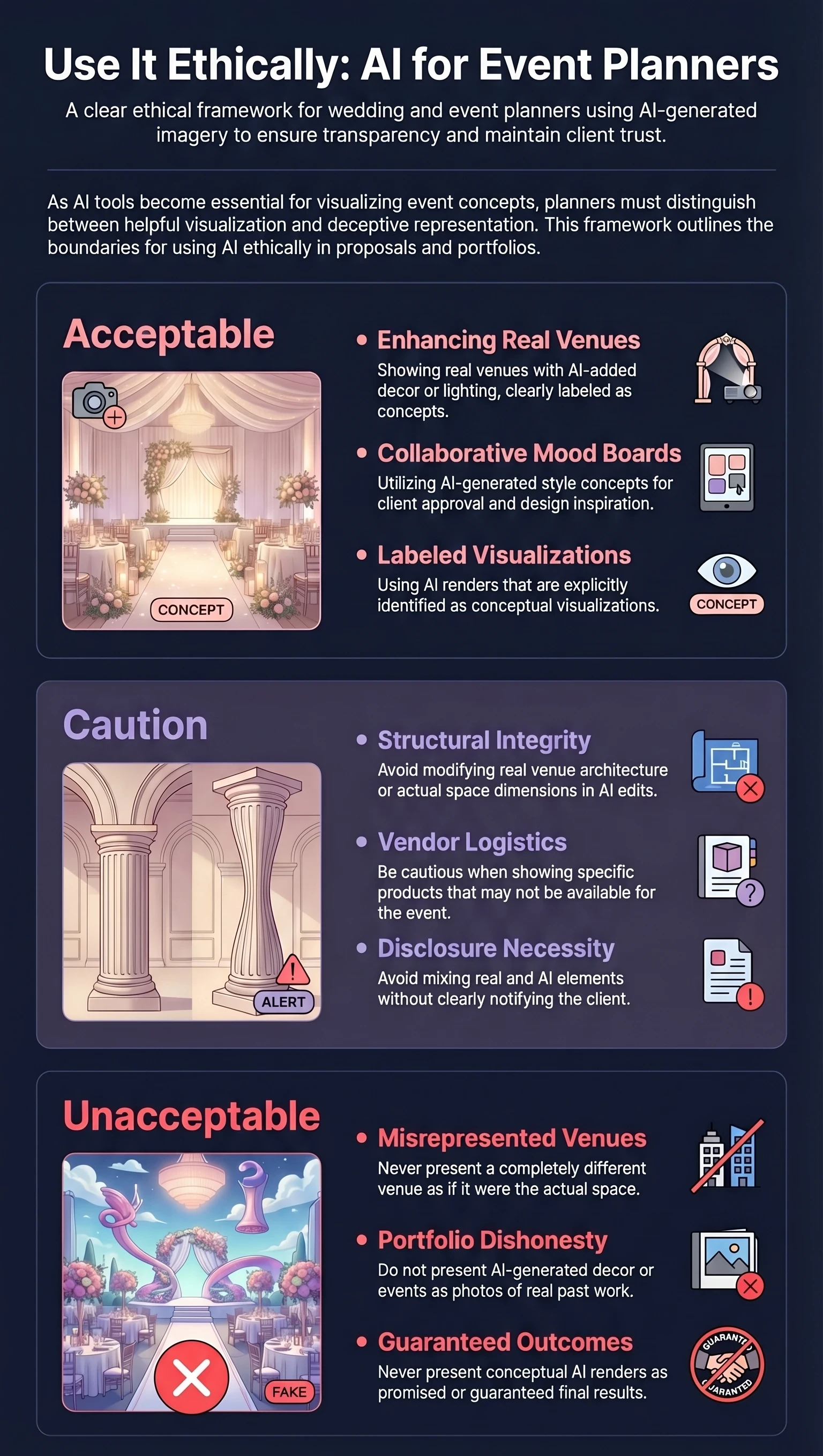
Trust, Transparency, and What a Venue Must Not Do
The commercial case for venue visualisation is strong. So is the responsibility that comes with it. Buyers making significant booking decisions - sometimes months in advance, often for events that cannot easily be rescheduled - are placing real trust in the venue's marketing materials.
The standard that protects both the venue and the client is straightforward: the real space must remain real. RogerApp.ai works by editing the actual venue photo, which means the architecture, dimensions, and core character of the space are always present in the visual. What gets added or changed is the event context - the styling, the setup, the atmosphere.
Conclusion
The venues that consistently fill their calendar are not always the most impressive spaces. They are the ones that make it easiest for potential clients to picture their event happening there.
RogerApp.ai gives venue owners a practical way to close that gap - starting from the real space, preserving what makes it distinctive, and showing it in every commercial context that matters to every buyer group.
A single venue can be marketed as a wedding space, a corporate event venue, a holiday party venue, a product launch venue, and a photoshoot location - all from the same base photography, at a fraction of the cost of traditional re-staging.
The venue stays real. The event context changes. The buyer understands what they are booking before they have even made the call. That is what makes an event space easier to sell - and what turns a listing into a consistent source of bookings across the full calendar year.
Frequently Asked Questions
Can I use RogerApp.ai visuals on venue booking platforms and listing sites?
Yes, provided the visuals are clearly presented as concept or styled renders rather than photographs of a specific past event. Most venue booking platforms permit concept imagery in listings - the key is honest labelling. A caption such as "concept visualisation" or "styled render" is sufficient in most contexts and is standard practice in venue marketing.
How many different event setups can I create from a single venue photo?
In practice, a good base photo of the real space can support six to ten distinct event context visuals - covering wedding, corporate, dining, seasonal, launch event, and photoshoot location scenarios. The limiting factor is usually the base image quality and the angle of the original shot, not the number of concepts that can be applied to it.
Does this replace the need for a professional venue photoshoot?
Not entirely - but it significantly reduces the frequency and scope of re-shoots required. A strong base set of professional venue photos remains the foundation. What RogerApp.ai replaces is the need to re-stage and re-shoot the venue every time you want to show a different event type or a new seasonal look.
What is the difference between using RogerApp.ai and hiring a 3D rendering studio?
A 3D rendering studio creates a digital model of the venue from scratch and renders event scenarios within that model. The results can be impressive but the process is slow, expensive, and produces visuals that do not look like the real space. RogerApp.ai works directly with the actual venue photograph, which means the output retains the real lighting, the real materials, and the real atmosphere of the space.
How do I show corporate clients their branding applied to the venue?
RogerApp.ai includes text and image overlay tools that allow branded signage, screens, banners, and stage backdrops to be added directly to the venue photo. For a product launch venue pitch or a corporate event venue proposal, this means you can show the client's actual logo, brand colours, and event name applied to the real space before they have committed to a booking.
Can older venue photos be used, or does the base image need to be recent?
Older photos can often be used effectively, particularly after upscaling. The main requirements for a good base image are a clean, uncluttered view of the space, consistent and flattering lighting, and a composition that shows the key architectural features of the venue. Photos with strong natural light, high ceilings, or distinctive architectural details tend to produce the best results.
Learn more in the RogerApp.ai tutorial
These tutorial sections walk through the exact techniques used in venue visualization:
-
How to write effective prompts for photo editing →
The prompt formula that works across all editing tasks - including venue styling with specific furniture, lighting, and mood descriptions. -
Manual Masking - paint exactly what you want to change →
When you want to protect architectural features - windows, floors, built-in elements - and only change specific areas like furniture or lighting. -
Auto-Masking - let AI find what to edit →
Type the object name - "tables", "chairs", "lighting" - and the AI finds and masks it automatically. The starting point for Reverse Mask workflows. -
Reverse Mask - protect your selection, change everything else →
The fastest workflow for full-venue styling while keeping architectural details intact. -
Fix and upgrade lighting →
Correct dark or poorly lit venue photos before styling - shadows and exposure adjusted to match your desired atmosphere. -
Super Resolution - upscale for marketing materials →
Increase image quality to 2400×2400 pixels for high-resolution output suitable for printed brochures and large-format presentations.