Wedding & Event Planning Use Case
How Wedding Planners Can Sell the Vision Faster With Venue-Accurate AI Visualisation
Mood boards and Pinterest references inspire clients, but they rarely close the deal on their own. Every wedding planner knows the situation: you have spent hours curating the perfect wedding mood board - the color palette, the floral references, the table setting inspiration. The client nods along. They like the aesthetic. And then they ask the question that stalls every proposal: "But what will it actually look like in our venue?"
The problem is not that clients lack imagination. It is that they are not buying an aesthetic in theory. They are buying confidence that their event will look right in their actual space - with those ceiling heights, that lighting, those walls. A wedding color palette shown in a Pinterest image from a Tuscany villa does not translate easily to a converted barn in the English countryside or a rooftop terrace in Barcelona.
This gap between inspiration and spatial reality is where planners lose time. Explaining the same concept in three different ways, across multiple meetings, costs momentum. And when visual uncertainty lingers too long, it can make clients hesitate before signing off on deposits - even when they genuinely love the idea.
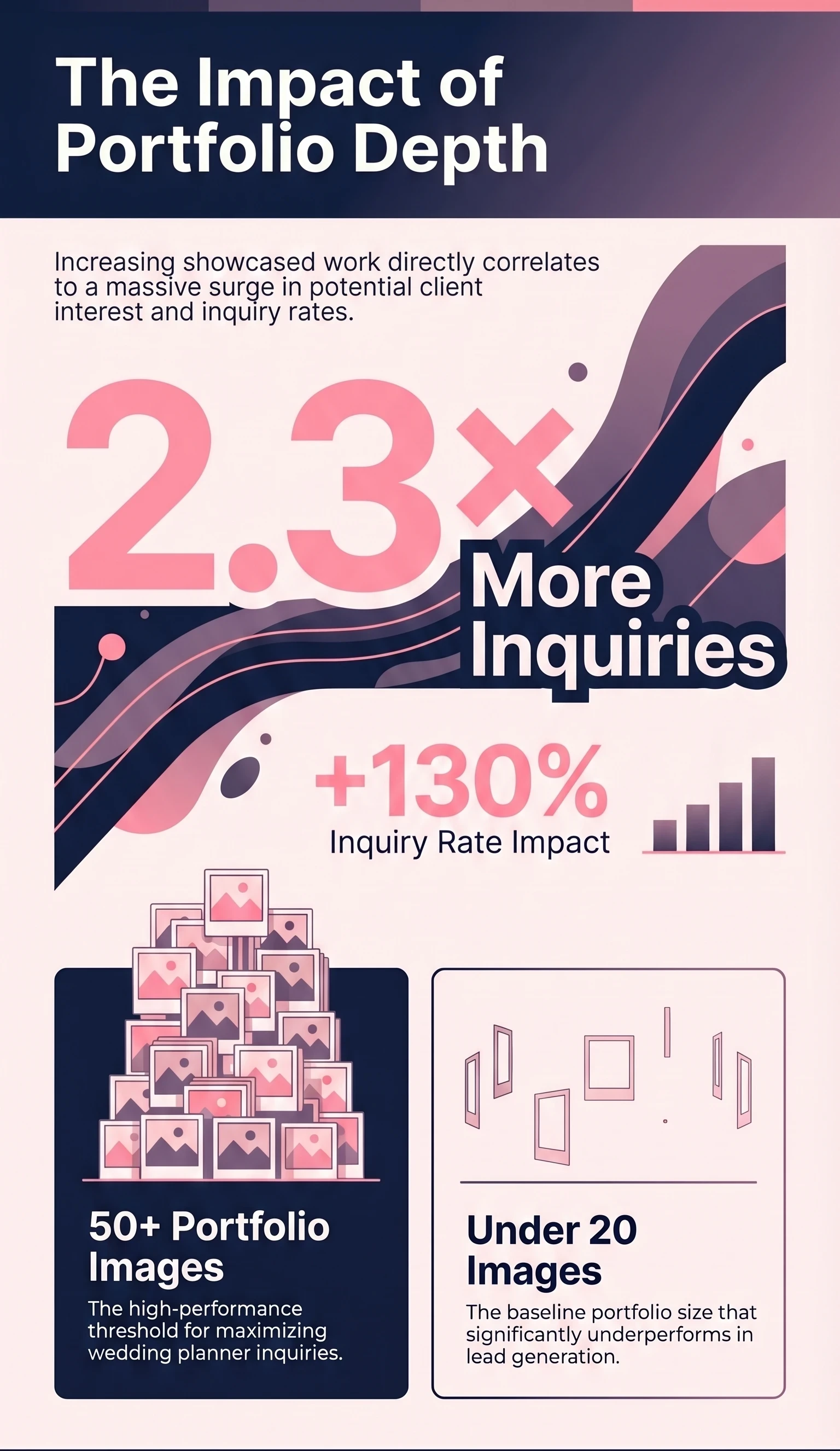
Research consistently shows how much visual credibility matters at this stage. Wedding planners with 50 or more portfolio images receive 2.3 times more inquiries than those with under 20. The planner who can show more - and show it more clearly - wins the client before the first meeting is even over.
Key Takeaways
| Point | Details |
|---|---|
| Clients hesitate before deposits | When they cannot picture the concept in their actual venue, visual uncertainty stalls booking decisions. |
| RogerApp.ai edits the real venue photo | It does not generate a fantasy version of a different space - the architecture, dimensions, and lighting remain recognizable. |
| Venue-accurate visuals shorten sales cycle | Concept visualisation in proposals has been shown to reduce sales cycle length by up to 30%. |
| Premium service opportunities | Visual concept work can be productised into chargeable services like venue comparison packs and theme previews. |
| Transparency is essential | AI-assisted visuals are legitimate - as long as they are clearly labelled as concepts, not past work. |
The Real Problem With Mood Boards
This gap between inspiration and spatial reality is where planners lose time. Explaining the same concept in three different ways, across multiple meetings, costs momentum. And when visual uncertainty lingers too long, it can make clients hesitate before signing off on deposits - even when they genuinely love the idea.
Research consistently shows how much visual credibility matters at this stage. Wedding planners with 50 or more portfolio images receive 2.3 times more inquiries than those with under 20. The planner who can show more - and show it more clearly - wins the client before the first meeting is even over.
What RogerApp.ai Actually Does for a Planner
RogerApp.ai is not a random image generator. For wedding and event planners, its most commercially useful function is precise: take the real venue photo and selectively edit it to show the styled version of that exact space.
The architecture stays. The dimensions stay. The ceiling, the windows, the floor - all of it remains recognizable as the actual venue the client has already chosen or is considering. What changes is everything the planner controls: the florals, the table settings, the ceremony setup, the draping, the candles, the lounge corners, the lighting mood, the signage, and the stage styling.
This is the fundamental difference between a concept visual and a mood board. A mood board shows what the planner likes. A venue-accurate concept visual shows what the client's wedding could look like in their actual space. That distinction is what moves a proposal from "I love the idea" to "let's go ahead."
The tools inside RogerApp.ai that make this possible include masking for selective edits, image merging to layer elements into the real photo, reverse masking to protect specific areas, color and light adjustments to shift the atmosphere, text overlays for signage and branding, and upscaling for presentation-quality output. The key is that these are editing tools working on a real image - not generation tools producing something that looks nothing like the actual venue.
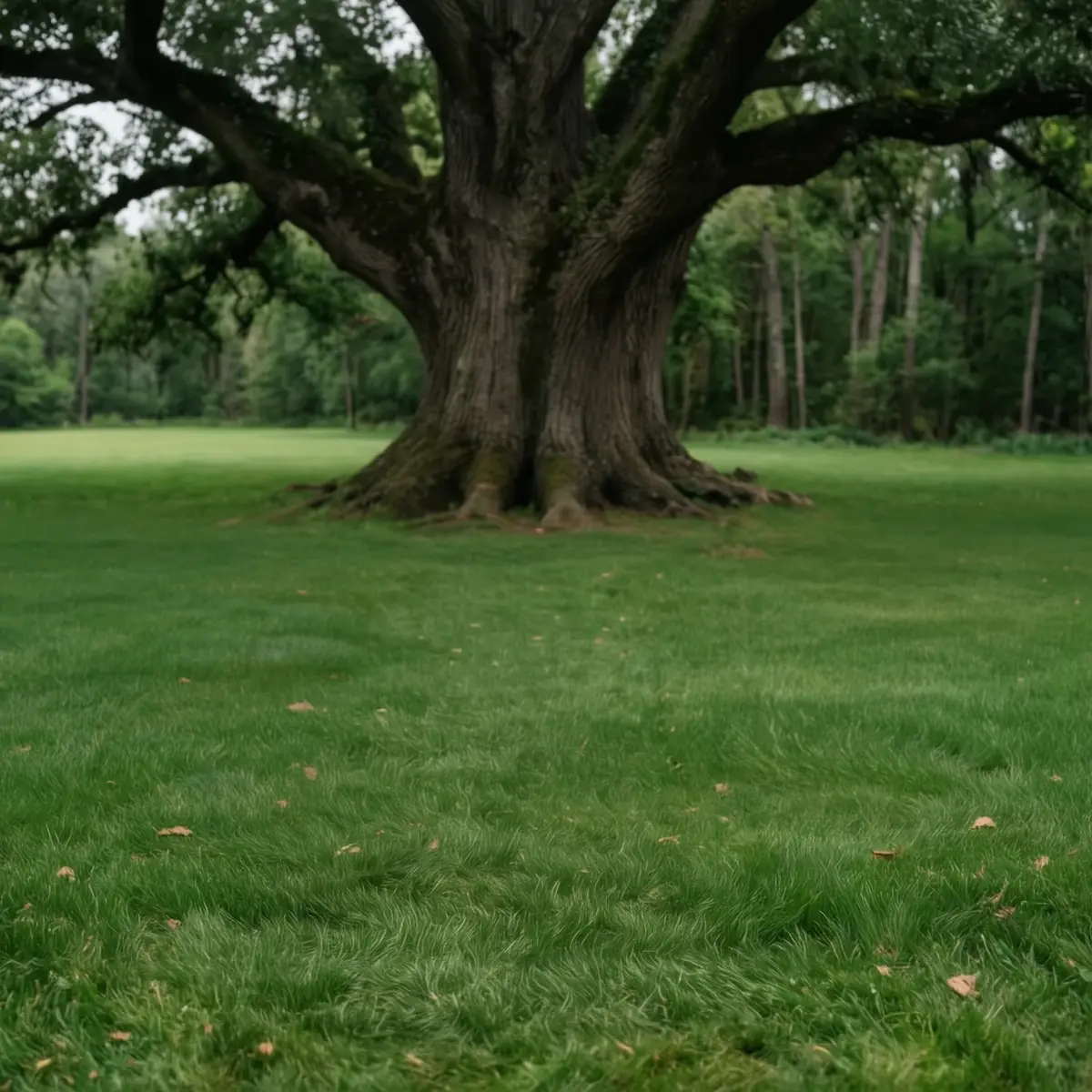
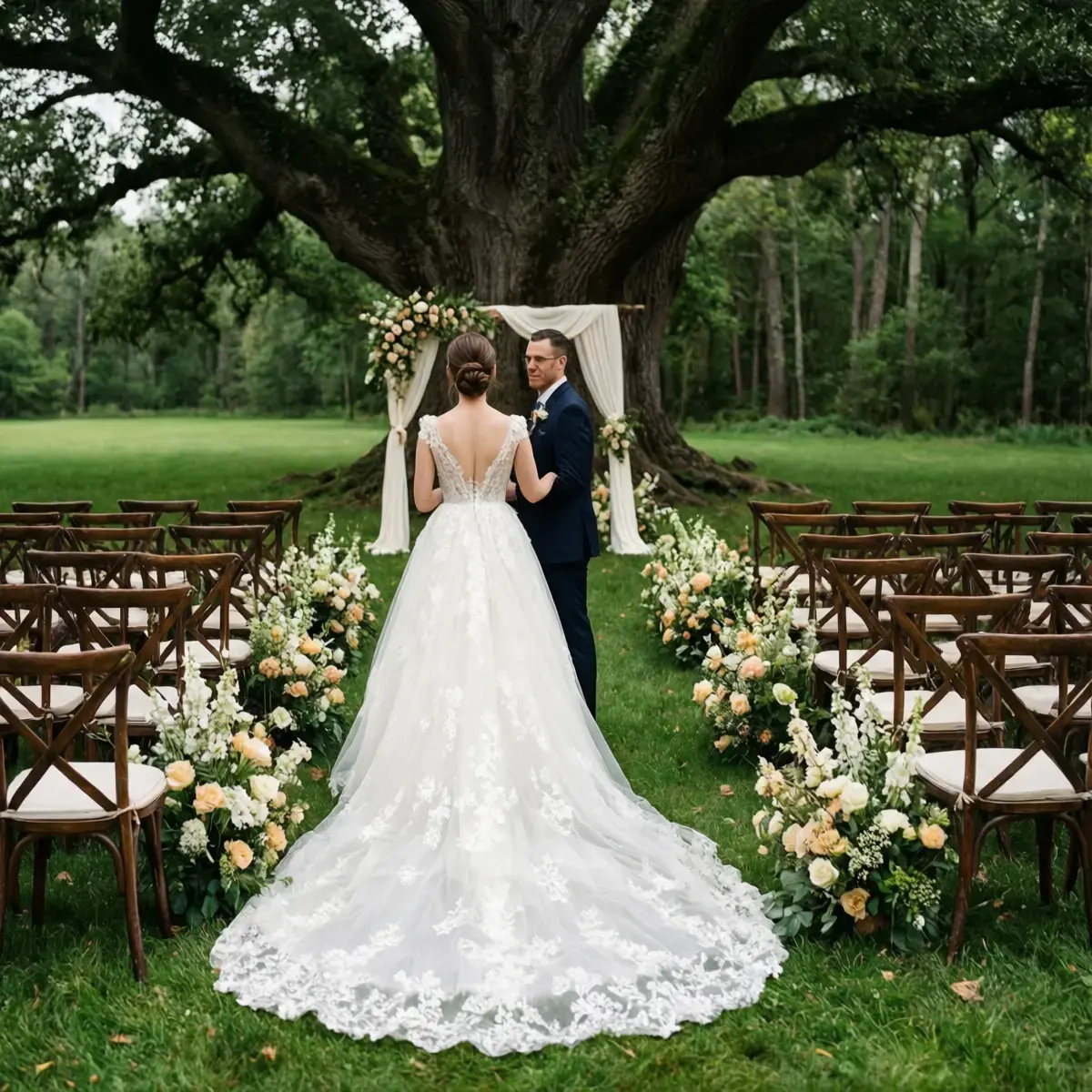
The empty source venue - a garden space under a large oak tree with no ceremony setup. The edited photo shows the same venue after AI wedding styling: floral arch, aisle arrangements, and guest seating added in RogerApp.ai.
The Best Use Cases for Wedding and Event Planners
The most powerful uses of RogerApp.ai for planners are the ones that directly reduce client uncertainty and accelerate decisions. Here are the seven that deliver the strongest commercial results.
1. Show the client their wedding styling ideas in their chosen venue
Take the actual venue photo and dress it with the proposed florals, table settings, and ceremony setup. The client sees their concept in the real space, not in a reference image from a different country.
2. Compare the same wedding concept across multiple possible venues
When clients are deciding between two or three photoshoot locations or ceremony spaces, visualising the same setup in each venue makes the choice concrete instead of abstract.
3. Present two or three wedding color palette directions in the same space
Instead of describing the difference between dusty rose and terracotta, show both versions in the same venue. Clients make faster and more confident decisions when the comparison is visual.
4. Upgrade proposal decks with venue-accurate concept renders
A proposal deck with real venue visuals converts significantly better than one built entirely from stock imagery and mood board references.
5. Expand portfolio variety without re-staging past events
Create concept visuals that demonstrate style range - clearly labelled as concepts - before the planner has physically executed every type of event.
6. Create visual briefing boards for vendors and collaborators
Florists, caterers, and lighting designers work better from venue-accurate visuals than from text descriptions or generic mood boards.
7. Show branded event versions for corporate clients
Corporate event venue bookings often depend on the client seeing their brand applied to the real space. RogerApp.ai can add signage, branding, and event-specific staging to any venue photo.
Why This Creates More Value for the Client
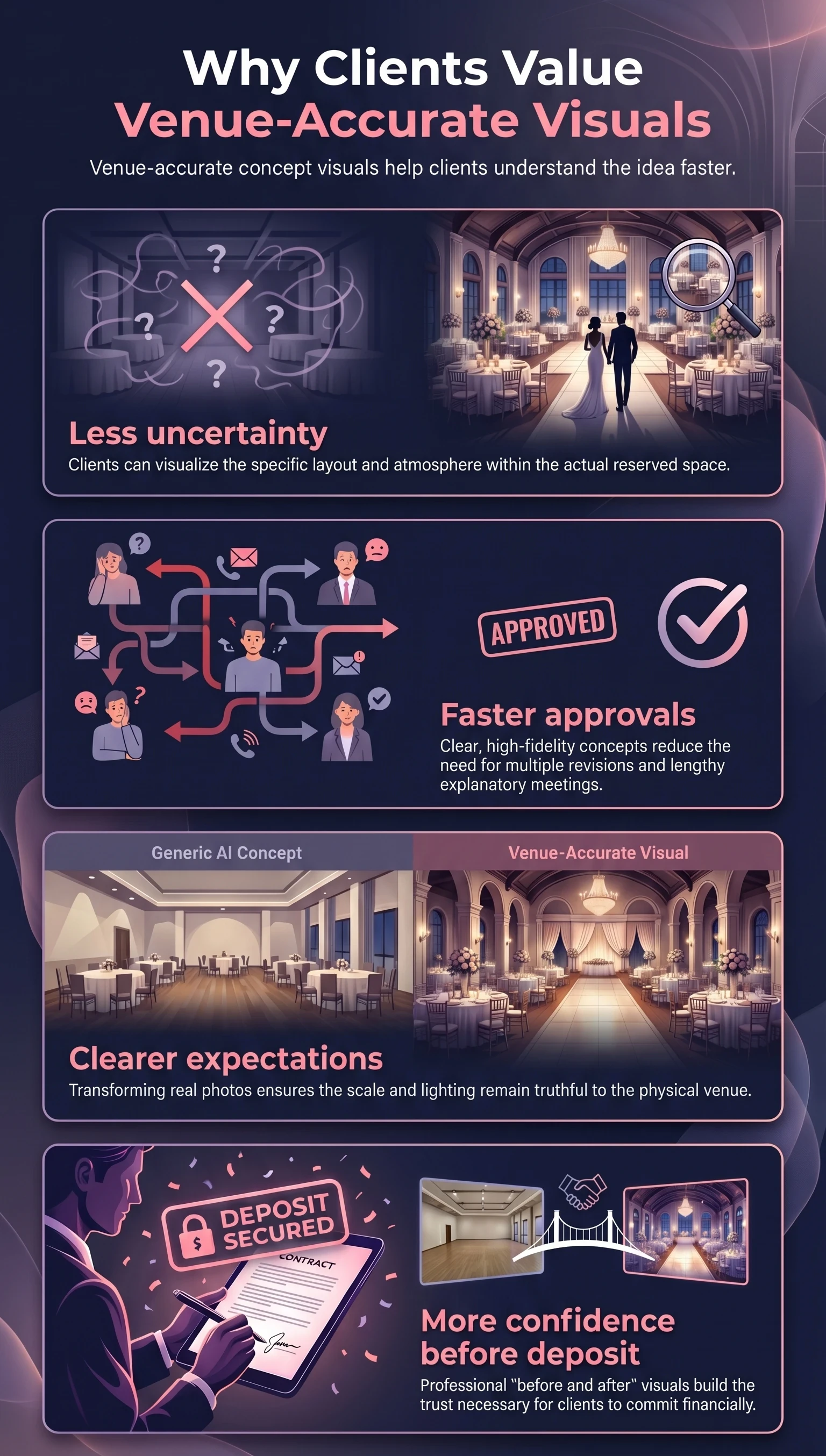
The commercial argument for venue-accurate visuals is strong. But the reason it works is rooted in something simpler: clients feel less anxious when they can see what they are committing to.
Planning a wedding involves a large financial commitment made months or years in advance. The client is asked to trust the planner's vision based on references and descriptions of something that does not yet exist. That gap - between what is described and what the client can actually picture - is where doubt lives. It is also where couples disagree with each other, where families get involved with conflicting opinions, and where approval cycles stall.
Venue-accurate concept visuals remove a significant portion of that gap. Clients understand the idea faster. They can compare two different styling directions side by side in the actual space. They can show the visuals to their family and get alignment without the planner having to be in the room for every conversation. And when the concept is clear, the decision to move forward - including paying the deposit - becomes easier to make.
This is not about making the process feel flashier. It is about reducing the cognitive load that clients carry when they are trying to commit to something they cannot yet fully see.
The Business Case for the Planner
The impact of concept visuals is not limited to the client experience. For the planner, it changes the economics of the sales process in measurable ways.
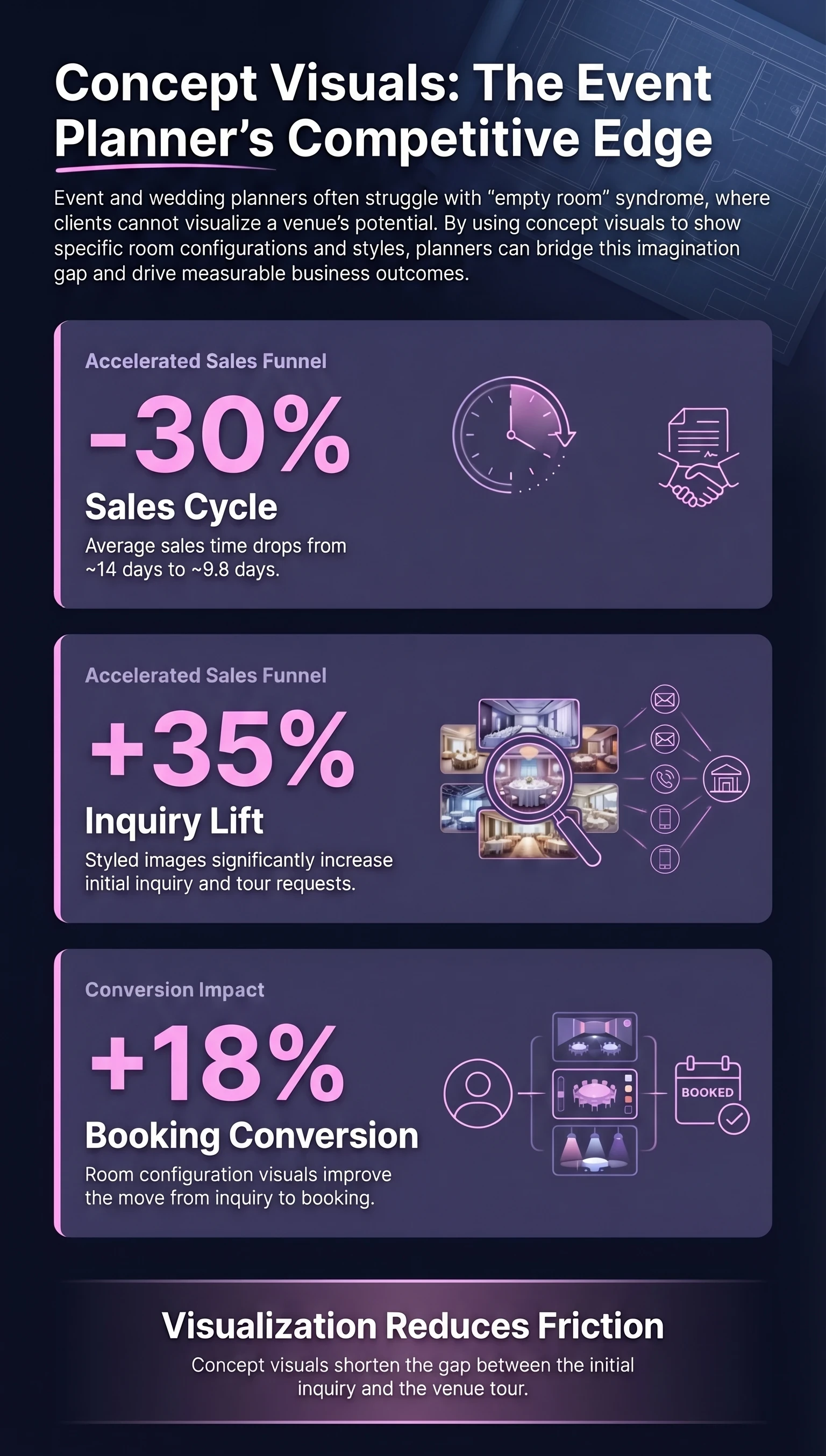
Concept visualisation in proposals has been shown to shorten the sales cycle by up to 30 percent. Styled images increase initial inquiry and tour requests by 35 percent. And when clients can see different setup configurations clearly, booking conversion improves by 18 percent. These are not marginal improvements - they reflect a fundamental shift in how quickly a client reaches the point of confidence needed to commit.
For the planner, the implications go beyond speed. A planner who arrives at a first meeting with venue-accurate concept renders of the client's actual space signals a level of preparation and professionalism that is difficult to replicate with mood boards alone. It positions the planner as someone who has already thought through the event in visual detail - which is exactly the kind of reassurance clients are paying for.
Visual clarity also justifies stronger pricing. When the planner can show not just what they will do but what it will look like, the value of the service becomes tangible before any contract is signed. That tangibility is one of the most effective arguments for a premium package price.
New Premium Services a Planner Can Sell
The real opportunity here is not just internal efficiency. It is productisation. RogerApp.ai gives planners the ability to turn visual concept work - which many currently do informally and for free - into a defined, chargeable service layer.
The planner can charge for clarity. The visual concept becomes part of the offering, not just prep work that happens behind the scenes before the first client meeting.
Venue Comparison Visual Pack
The same wedding concept shown across two or three candidate venues, giving the client a concrete basis for comparison.
Wedding Theme Preview Pack
A set of venue-accurate visuals showing the proposed theme, color palette, and key styling elements in the actual space.
One Venue, Three Styling Directions
Three distinct concept directions shown in the same venue, allowing the client to choose a direction with confidence rather than guesswork.
Proposal Deck Upgrade
Enhanced proposals with venue-accurate renders replacing stock imagery and generic mood board references.
Visual Brief for Vendors
Visual briefing materials for florists, caterers, and lighting teams that show the concept in the actual venue context.
Corporate Branded Event Preview
For corporate clients: the event space shown with the client's branding, signage, and event-specific setup applied to the real venue photo.
Portfolio Expansion Without Misrepresenting Past Work
One of the most useful - and most sensitive - applications for planners is portfolio development. Early in a career, or when expanding into new event styles, a planner often needs to show visual range before they have physically executed every type of event.
RogerApp.ai can help create inspiration-led concept visuals that demonstrate what the planner is capable of envisioning and directing. A holiday party venue styled for an intimate winter dinner. A corporate event venue showing a product launch venue setup. An outdoor space transformed for a boho ceremony. These visuals can communicate style and competence effectively.
The critical line is transparency. Concept visuals should always be clearly labelled as concepts, visualisations, or inspiration - never presented as photographs of real past events if they are not. The label is not a disclaimer that weakens the work. It is what allows the client to trust both the visual and the planner showing it to them.
| Acceptable | Caution | Not Acceptable |
|---|---|---|
| Real venue with AI-added concept decor, clearly labelled | Changing venue dimensions or architecture significantly | Presenting concept visuals as photos of real past events |
| Proposal visuals and styling direction previews | Showing vendor products that may not be available | Showing a different venue as the client's actual space |
| Inspiration visuals for vendor briefings | Mixing real and generated elements without clear disclosure | Presenting AI renders as guaranteed final results |
| Portfolio concepts labelled as visualisations |
Conclusion
The strongest argument for venue-accurate concept visualisation is not about technology. It is about what clients actually need in order to say yes with confidence.
Mood boards will always have a role in the wedding planning process. They are fast, expressive, and useful for establishing aesthetic direction early. But they do not replace the specific visual certainty that a client needs before committing to a significant investment in a space they have only seen empty or in someone else's event photos.
RogerApp.ai gives planners a way to bridge that gap - starting from the real venue, preserving what is real, and showing only what the planner is proposing to change. That specificity is what turns inspiration into a signed contract. It is what makes the planner look prepared rather than aspirational. And increasingly, it is what clients expect from a premium planning service before they pay the first deposit.
This is not about replacing real event work. It is about making visual planning commercially stronger - for the planner, and for every client who needs to see it before they can believe it.
Frequently Asked Questions
How is a venue-accurate concept visual different from a mood board?
A mood board collects references from different sources - other venues, other events, stock photography - to convey an aesthetic direction. A venue-accurate concept visual starts from the client's actual venue photo and edits it to show how the proposed styling would look in that specific space. The architecture, dimensions, and lighting conditions of the real venue remain recognizable. What changes is only what the planner is proposing: florals, table settings, ceremony setup, lighting mood, and so on.
Can images created with RogerApp.ai be used in marketing and portfolio materials?
Yes, with appropriate labelling. Concept visuals created with RogerApp.ai can be used in proposals, on websites, and in social media content - provided they are clearly identified as concepts or visualisations rather than photographs of real past events. The label is not a weakness. Clients understand and appreciate the transparency, and it protects the planner's professional credibility.
Does visualising the concept in the venue really speed up the sales process?
The data suggests it does significantly. Concept visualisation in proposals has been associated with a 30 percent reduction in sales cycle length, a 35 percent increase in inquiry volume from styled portfolio images, and an 18 percent improvement in booking conversion. The underlying reason is straightforward: clients who can see the concept clearly in their actual venue have fewer unresolved questions before committing, which means fewer rounds of back-and-forth and faster decisions.
What if the final event does not look exactly like the concept visual?
This is precisely why labelling visuals as concepts rather than promises is essential. A concept visual communicates direction, atmosphere, and styling intent - not a guaranteed photographic reproduction of the finished event. When this is communicated clearly at the proposal stage, clients understand they are approving a direction, not a pixel-perfect guarantee. Most clients are comfortable with this distinction when it is explained honestly and early.
Which RogerApp.ai features are most useful for wedding planners?
The most commonly used tools for venue concept work are masking and selective editing - which allow specific areas of the venue photo to be changed while the rest remains untouched - along with image merging to layer styled elements into the real space, color and light adjustments to shift the atmospheric mood, and upscaling for high-resolution output suitable for printed proposals and large-format presentations. The ability to change object colors in photos and replace objects in a scene is also useful for showing alternative styling options without reshooting.
Can RogerApp.ai help if I want to show the same wedding at different possible venues?
Yes, and this is one of the strongest use cases for planners working with clients who are still choosing between venues. By applying the same concept styling to photos of two or three different photoshoot locations or event spaces, the planner gives the client a concrete visual comparison rather than an abstract one. This is particularly useful when the venues have very different characteristics - outdoor versus indoor, historic versus contemporary, intimate versus large-scale - and the client needs help understanding how their vision will translate to each space.
Learn more in the RogerApp.ai tutorial
These tutorial sections walk through the exact techniques used in this workflow:
-
How to write effective prompts for photo editing →
The prompt formula that works across all editing tasks - including the positive-form principle that makes styling prompts significantly more accurate. -
Manual Masking - paint exactly what you want to change →
When you want to protect existing elements - venue architecture, flooring, windows, built-in features - and only change specific areas like table settings or florals. -
Auto-Masking - let AI find what to edit →
Type the object name - "tables", "chairs", "ceiling" - and the AI finds and masks it automatically. The starting point for Reverse Mask workflows. -
Reverse Mask - protect your selection, change everything else →
The fastest workflow for full-venue styling while keeping architectural details intact. -
Fix and upgrade lighting →
Correct dark, flat, or poorly lit venue photos before styling - shadows and exposure corrected to match your desired atmosphere. -
Super Resolution - upscale before you style →
Increase image quality to 2400×2400 pixels before styling. Gives the AI more detail to work with and produces a cleaner result suitable for printed proposals.